> FEED
[ Deskercise Performance Lab ]
Your desk is a tiny gym.
0 bytes of your typing, ever
Counts your mouse miles and keystrokes (never which keys) and turns them into a tiny, honest calorie number. Mac and Windows.
$2.99 USD once, plus sales tax where it applies. Charged by Polar, our payment processor. 30-day refund.
- WIN 10 & 11
- macOS 14+
- 0 accounts
- 0 subscriptions
- Ctrl + Alt + Lift
- 1 keystroke ≈ 0.0005 calories
- A whole day of clicking ≈ half a breath mint
- Do you even scroll?
- 570,000 keystrokes = one slice of pizza
- No subscription · No shower · No excuses
- Rest days: whenever you hit Pause
- Form over function keys
01 Live telemetry
You're training right now.
Type here. Now open your Network tab. We'll wait.Scroll this page and tap around. Your thumb is in training.
Move the mouse, click, scroll, type something.On a phone it counts your taps, how far your thumb travels and how far you scroll. It all happens in this tab: your counts aren't sent anywhere, and keys are counted, never read. Same deal as the app, which has a Live page just like this one.
Measured in screen pixels, so this is wildly unscientific. The app reads your mouse's actual sensor, so it's only mildly unscientific.
Session · this tab
Live 00:00
0.000000calories
≈ 0.0000000 gummy bears
- Cursor distanceThumb distance
- 0.00 ft
- ClicksTaps
- 0
- Scrolled
- 0.0 ft
- Keystrokes
- 0
Mouse speedThumb speedPeak 0.00 mph
At this pace, your next gummy bear arrives in ∞
Waiting for movement. Wiggle the mouse, champ.
02 The dashboard
Your stats, lovingly over-analyzed.
For the athlete who needs to know exactly how many sugar cubes their spreadsheet was worth.
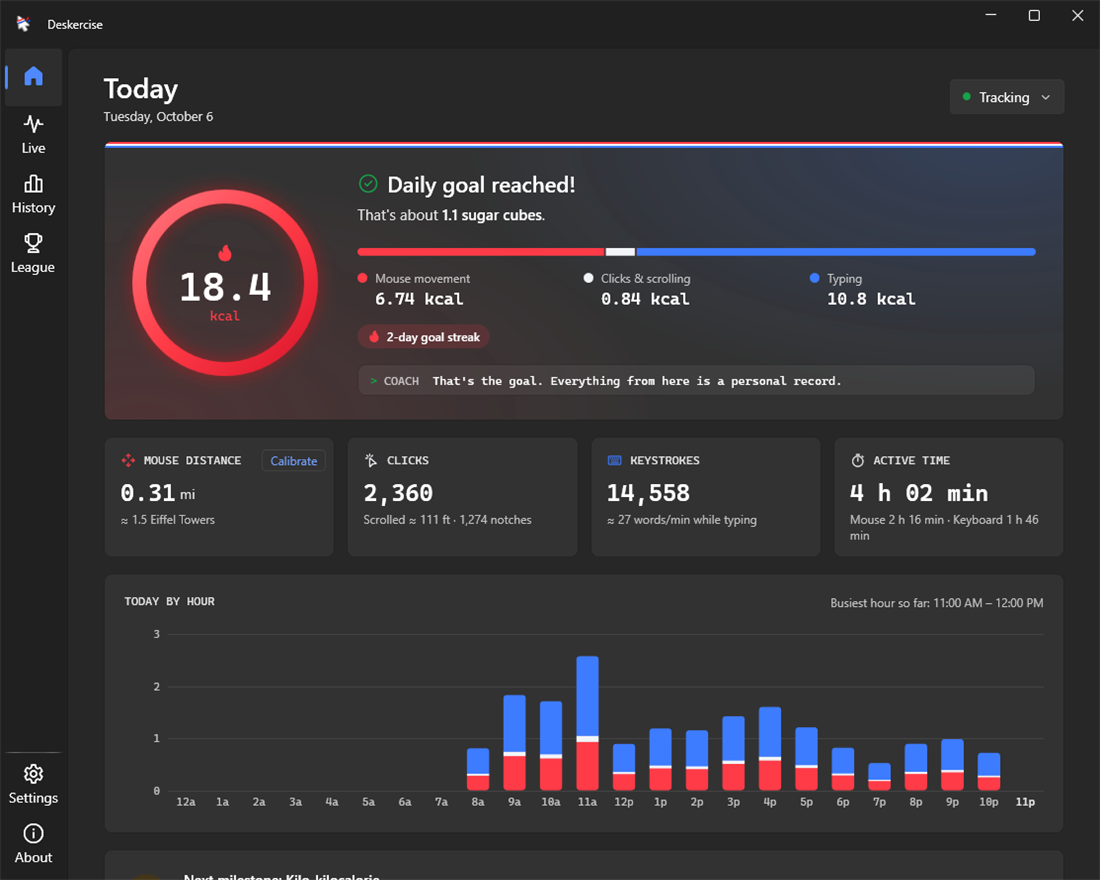
- Goal ring. Fills at your daily goal. Ten calories by default. Dream big.
- Snack exchange rate. Every total, converted into a food you could have eaten instead.
- The breakdown. Mouse movement, clicks & scrolling, and typing, in sweatband red, white and blue. Typing usually wins. Sorry, mouse.
- Hourly splits. For the post-game analysis. Peak performance: 11 AM. Lunch break: visible from space.
03 The science
Physics, not vibes.
Mouse calories aren't a made-up number. They're a made-up number with physics in it.
Deskercise reads raw sensor counts, converts them to real distance, and works out the effort: sliding friction, plus speeding your hand up and braking it (braking is five times cheaper; muscles are thrifty like that). Then it adds the steady cost of keeping your arm in the game, calibrated against lab measurements of people typing and gaming.
Every figure is calories above sitting still: what the work adds, not what you'd burn anyway.
Lab measurements: Mansoubi et al. 2015 (BMC Public Health), Newton et al. 2013 (PLoS ONE), Nicholson et al. 2024 (Sports Medicine – Open). Peer reviewed by one (1) mouse.
# Deskercise energy model
# every figure: calories above sitting still
engaged      = 2 calories/h active  # holding the arm at the ready
mouse        = μ·N·d ÷ η            # friction on the mouse pad
             + k_force·(W⁺ ÷ 0.25   # speeding up: ~25% efficient
                       + W⁻ ÷ 1.2)  # braking: 5× cheaper. like meetings.

keystroke    ≈ 0.0005 calories      # never which key
click        ≈ 0.0003 calories      # double-click: twice
scroll_notch ≈ 0.0001 calories      # spin class for one finger
# figures for a 154 lb athlete; the app scales them to your weight
sweat = 0.0 ml # theoretical- Typical office day
- 10–20 calories
- That's about
- 1 sugar cube
- Sweat produced
- 0.0 ml
- Abs gained
- Inconclusive
04 Head to head
We're not saying it's a better gym.
We're saying you are already sitting at one.
| Comparison | A gym |  Deskercise Deskercise |
|---|---|---|
| Price | $40 a month, forever | $2.99, once |
| Commute | 20 minutes each way | 0 ft. You're already here. |
| Calories per session | 300 to 600 | 10 to 20 a day. About one sugar cube. |
| Showers required | 1 | 0 |
| Mirrors | Everywhere | None |
| Works during meetings | No | Especially then |
| Cancelling | A phone call, a form, and a man named Gary | There's nothing to cancel |
Our calorie figures are honest estimates. Gym prices vary. Gary isn't a real person, but you've definitely met him.
05 The program
A three-step program.
Step two is optional.
-
01 · Warm-up
Install and activate.
Paste the license key from your receipt. On Windows, Deskercise counts from your system tray, next to the clock. On a Mac, it counts from the menu bar once you allow Input Monitoring.
-
02 · Form check
Calibrate your mouse.
Slide your mouse across your keyboard's bottom row (or a ruler, or your phone) twice so Deskercise learns how far it really moved. About a minute. On a Mac trackpad, distance is estimated instead, because macOS doesn't share a trackpad's raw movement.
-
03 · Train
Keep working.
Check your calories, goal ring and streak whenever you're curious. That's the whole workout.
There is no step four. There is never a step four.
06 Privacy
Not a keylogger.
A key counter.
Deskercise counts keystrokes the way a bouncer counts people. It doesn't need to know who they are. It notices that a key went down, adds one, and forgets the rest.
What leaves your computer
Never
- Which keys you pressed, or anything you typed
- Where your cursor was, screenshots, window titles, apps or websites
- Your stats history. It stays on your computer, in files you can open (League members share daily totals only, below).
- Analytics or tracking of any kind
Only if you join The Desk League
- The username you pick, plus your daily calories. Your mouse distance, clicks and keystrokes go too only while you're on the worldwide board or in a Friends league, the boards that show them. Your key is checked once when you join. Leave and it's all erased; so is an account with no activity for 12 months.
- Who sees them is up to you: the worldwide board is optional, and Office leagues show coworkers your calories only. If Office leagues are all you're in, your calories are all that's sent.
Routine checks
- License check: your key, when you activate and about once a month after. If it can't connect, the app keeps counting.
- Update check (Windows): asks whether there's a new version. You can turn it off.
- League page: while it's open, the app loads the public standings. Nothing about you unless you've joined.
07 The Desk League
Compete from your chair.
Start a private league with your team or friends: share one invite code, or invite them by username. The worldwide board is there too, if you want it. Weekly standings reset every Monday at 00:00 UTC, which is Sunday evening in the US.
- Friends or Office. Whoever starts a league picks. Friends leagues show everyone's calories, keystrokes, clicks and mouse distance. Office leagues show calories only: coworkers never see each other's keystrokes, clicks or distance, and if Office leagues are all you're in, the app sends your calories and nothing else.
- Worldwide is optional. Play only in your mini leagues if you like, and keep out of username search too. An invite code still gets your friends in.
- Fair weigh-in. Everyone's scored at 154 lb, so it ranks effort, not size.
- Members only. Opt in, opt out. Join from the app with your license key: one username per key (a launch-week second key gets its own). The League sees a username and daily totals, never what you typed. Leaving erases it all, and an account with no activity for 12 months is erased too.
Season 1
Live
Season one starts at launch. Until then, here's the board with sample players, sped up so you can see how it plays.
Office crew
Calories only. Coworkers never see each other's keystrokes, clicks or mouse distance, and whoever started the league sees nothing extra.
Season one starts at launch. The bench is empty and the chalk is fresh.
Standings
Relegation to the break room is not currently enforced.
08 Pricing
One-time purchase.
Cheaper than a protein bar. Lasts considerably longer.
$2.99
USD · One-time purchase
- Deskercise for Windows 10 and 11 (64-bit) and macOS 14 or later
- The Live page, history, 50 milestones and The Desk League, with private mini leagues
- Export your full history as CSV
- A license key for up to 3 of your computers
- No account, no ads and no tracking in the app. Works offline once activated.
- Free updates, downloaded in the background on Windows (the Mac app doesn't update itself yet)
Launch week
A free second key for a friend. Every $2.99 purchase this week includes a spotter key: a second license to give a friend or family member. Same app, full access, no strings.
$2.99 USD once, plus sales tax where it applies. Charged by Polar, our payment processor. 30-day refund.
About 72 MB on Windows. Already bought it? Your download link and license key are in your receipt email.
Buying on your phone? Your license key is in your receipt email. Deskercise runs on your Windows PC or Mac, so install it there and paste the key.
Or type deskerciseapp.com on your computer.
Gift & team pack
5 keys · $9.99
USD · $2.00 a key · Paid once
For gifting or your whole desk row: five separate keys on one receipt. Each one is a full license for one person, with its own League username. Group-class rates. Still no showers.
Buying for a company? Tick "I'm purchasing as a business" at checkout to add the company name and tax ID. The PDF invoice is in Polar's customer portal, linked from your receipt email.
Get the 5-pack · $9.99
$9.99 USD once, plus sales tax where it applies. Charged by Polar. 30-day refund.
09 FAQ
Frequently asked questions.
And a few infrequent ones.
Q.01 Will I get abs?
Wrist abs, possibly. Results not typical. Results not really possible.
Q.02 How accurate is it?
Honestly approximate. Mouse distance comes from the sensor and is accurate once calibrated. Calories come from a physical model (friction, hand acceleration and braking) plus the steady cost of keeping your arm engaged, checked against lab measurements of people typing and gaming, which put computer work at roughly 2–9 calories an hour above sitting still. Deskercise sits at the conservative end of that range, so a typical office day lands around 10–20 calories. It's a fun, grounded number, not a medical measurement.
Q.03 Is this a keylogger?
No. It's a key counter. It notices that a key went down and adds one to a number. Which key it was is never stored, logged or sent anywhere. On Windows, the secure screens (sign-in, the lock screen, Ctrl+Alt+Del and admin prompts) aren't visible to it at all. For exactly how it reads input, see the page For your IT person.
Q.04 Can I use it to lose weight?
In the way a raindrop can fill a swimming pool. The "A pound of fat" milestone takes about a year of working days. Please also go outside.
Q.05 Will it slow my computer down?
No. Input is counted on its own lightweight thread. On Windows, Deskercise uses a fraction of a percent of CPU while you work, does nothing at all while you're idle, and asks Windows 11 to run it in Efficiency mode when its window is closed.
Q.06 What do I need?
A PC with Windows 10 or 11 (64-bit), or a Mac with macOS 14 or later, and a mouse or trackpad. On Windows, the download is about 72 MB, and it installs just for your user account, in your own user folder.
Q.07 Does it work with a trackpad?
On a Mac, trackpad distance is estimated from how far the pointer moves, because macOS doesn't share a trackpad's raw movement. On Windows, Deskercise counts any pointing device that reports movement the way a mouse does, and calibrates each one separately. Pens and touchscreens report positions instead, so only their clicks and scrolling count. Typing counts the same everywhere.
Q.08 How does the license key work?
Your key arrives with your receipt. Paste it into Deskercise once: it's checked with our store and then the app works offline, no account needed. It quietly re-checks about once a month, and a failed connection never locks you out. A key activates on up to 3 of your computers, and you can move it with Deactivate this PC (on a Mac, Deactivate this Mac) in Settings.
Q.09 Does it need the internet? What if you shut down?
Only to activate. After that, Deskercise keeps counting with no internet at all: the monthly license check is skipped quietly when it can't connect, and it never locks you out. If our servers ever went away, the app would keep counting on your computer. Only The Desk League would stop.
Q.10 What's The Desk League?
Optional standings for members. Pick a username in the app, then start a private mini league with your team or friends (share its invite code, or invite people by username), join the worldwide board, or both. Being on the worldwide board is optional: you can play only in your mini leagues, and you can keep out of username search. Whoever starts a mini league picks Friends, where everyone sees calories, keystrokes, clicks and mouse distance, or Office, where everyone sees calories only. They see nothing extra themselves; they can remove people and make a new invite code. Every board is scored at 154 lb, so it's fair. The League gets your username and daily totals, never what you typed or which keys. Leave from the app anytime and your League data is erased. If you never join, nothing is shared.
Q.11 Using it at work?
Your numbers stay in files on your computer. Nobody, including your employer, sees them unless you join the League: then the members of your mini leagues see them, and so does everyone if you're on the worldwide board (that's optional). In an Office league, coworkers see each other's calories only. If your IT team needs to approve it, send them For your IT person: how it reads input, every network destination, where data lives, and how to turn off the League and updates by policy.
Q.12 How do I know the installer is really from you?
The Windows installer and every update are code-signed by [PUBLISHER NAME], so Windows shows that name as the publisher. While Deskercise is new, Windows may still show a blue "Windows protected your PC" box: click More info and check that the publisher is [PUBLISHER NAME]. If it says "Unknown publisher" or any other name, don't run it, and email us at contact@deskerciseapp.com instead. The Mac app is notarized by Apple.
Q.13 Do I get updates?
Yes, free, for as long as we make them. On Windows they download in the background and install the next time Deskercise restarts, like a good spotter. You can turn that off in Settings. The Mac app doesn't update itself yet.
Q.14 Is it safe to run while I game?
Deskercise reads input the way any app can, through the standard input APIs (Raw Input on Windows, IOKit HID on a Mac). It doesn't inject anything into games, hook them or read their memory. It hasn't been tested against every anti-cheat system, so we can't promise none will ever object. If one does, exit Deskercise from its tray icon while you play (on a Mac, Quit Deskercise in the menu bar): Pause stops the counting, Exit stops the app.
Q.15 How do I uninstall it?
On Windows: Settings → Apps → Installed apps → Deskercise → Uninstall (on Windows 10: Settings → Apps → Apps & features). Your stats stay in %AppData%\Deskercise in case you come back; delete that folder to remove them too. On a Mac: quit Deskercise from the menu bar, then drag it from Applications to the Trash. Your stats stay in ~/Library/Application Support/Deskercise until you delete that folder. If you joined The Desk League, choose Leave League in the app first: that's what erases your League data. No exit interview, no Gary.
Q.16 Does my mouse need a sweatband?
Recommended. Not required.
Q.17 Is there a Mac version?
Yes. Deskercise runs on macOS 14 or later and lives in your menu bar. During setup, macOS asks you to allow Input Monitoring: it's the permission any app needs to notice a key press. Deskercise uses it to count presses and read your mouse's sensor, never to record which keys, and it never asks for Accessibility. After a quick restart of the app, it starts counting. On a trackpad, distance is estimated. The Mac app doesn't update itself yet.
Q.18 Can I get a refund?
Yes. If Deskercise isn't for you, email us within 30 days of buying for a full refund. No hard feelings.
Q.19 Can I buy for my team?
Yes. The gift & team pack is five separate license keys on one receipt, for $9.99. Each key is a full license for one person, with its own League username. The keys come with your receipt and stay in Polar's customer portal (the link is in your receipt email). Send one to each person, and they paste it into Deskercise like anyone else. For an invoice, tick I'm purchasing as a business at checkout and add the company name and tax ID. The PDF invoice is in the same portal, where you can also add or fix those details later. Need keys for more than five people? Buy another pack, or email us at contact@deskerciseapp.com about a bigger one.
10 The lab
About the lab.
Deskercise is an independent app for people who spend their days at a computer. It's built to be fun, honest about its numbers, and respectful of your privacy: one price, and no ads, accounts or tracking in the app.
The lab is a desk. The equipment is a mouse. The results are humbling.
Created by Emiliano: chief scientist, sole employee and primary test subject.
@emilianooo on X